The main difference between a USB stick and a photo stick is how they work in real use. A USB stick is a basic storage device where you manually select, copy, and manage files. A photo stick, on the other hand, is built to automatically scan, find, and back up photos and videos from phones, tablets, and computers with very little effort.
Many people search for what is the difference between a USB stick and a photo stick because both devices look similar at first glance. This guide explains how they actually behave during photo backups, where each one fits best, and how choosing the right option can help protect important memories from accidental loss.
What Is a USB Stick?
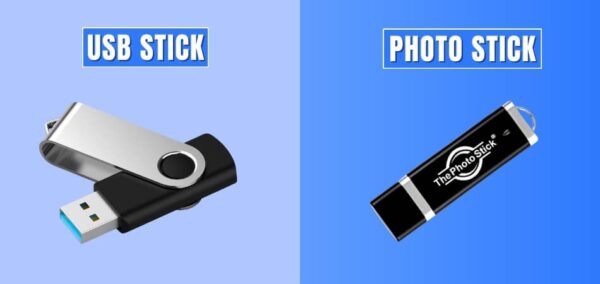
A USB stick, also known as a flash drive or thumb drive, is a portable storage device used to move or store files. You plug it into a computer, open folders, and manually copy files onto it. It works like a small external hard drive without moving parts.
USB sticks are commonly used for documents, videos, music, software installers, and file transfers between computers. Most people already own at least one because they are inexpensive and widely available.
However, USB sticks do not organize files for you. They do not scan your device, detect photos, skip duplicates, or automate backups. Everything depends on how carefully you manage your folders and files.
What Is a Photo Stick?
A photo stick is a storage device created specifically to back up photos and videos. Instead of manually selecting files, it scans your device automatically, finds supported media files, and saves them to the stick.
Photo sticks became popular as phones replaced cameras and photo libraries grew larger. Many users wanted a way to protect memories without dealing with cloud storage, subscriptions, or complicated software.
Most photo sticks work with phones, tablets, and computers. They usually include companion software or an app that guides the backup process step by step, making them accessible even for non-technical users.
What Is the Difference Between a USB Stick and a Photo Stick?
At a glance, USB sticks and photo sticks look almost identical, which is why many people confuse them. The real difference appears when you actually use them for backups, especially photos and videos. Before diving deeper, take a quick look at how they compare, then explore each point in detail below.
Quick Comparison Chart
| Aspect | USB Stick | Photo Stick |
| Primary use | General file storage | Photo and video backup |
| File handling | Manual copy and paste | Automatic scan and backup |
| Phone support | Limited and manual | Built for phones and computers |
| Ease of use | Requires file management | Simple and guided |
| Ideal for | Tech-comfortable users | Everyday users |
Purpose and Intended Use
A USB stick is meant for storing any type of file, from documents to videos, and gives full manual control. A photo stick is built with one clear purpose: backing up photos and videos safely. This focus makes photo sticks more practical for memory storage.
The Way Files Are Added
With a USB stick, you must manually select folders and files, which increases the chance of missing something important. A photo stick automatically scans your device, finds supported photos and videos, and saves them. This automation reduces mistakes and saves time.
Device Compatibility
USB sticks work best with computers and can feel inconvenient on phones. Photo sticks are designed for phones, tablets, and computers, often using built-in adapters. Devices like ThePhotoStick Omni show how photo sticks simplify backups across different platforms without extra steps.
Ease of Use for Everyday Users
Using a USB stick assumes you are comfortable managing files and folders. Photo sticks are made for simplicity, guiding users through the backup process. This makes them appealing for families, parents, and anyone who wants backups without technical effort.
File Organization and Duplicates
USB sticks store everything you copy, including duplicate files, unless you clean them manually. Many photo sticks automatically detect duplicates and organize media files. This keeps storage tidy and avoids confusion when accessing backed-up photos later.
Cost and Value Difference
USB sticks are cheaper because they only provide storage space. Photo sticks usually cost more because they include backup software and automation. If you want to understand how that value plays out in real use, you can read a detailed ThePhotostick Omni review for deeper insight.
In simple terms, a USB stick gives you storage, while a photo stick gives you a backup system. Both can store photos, but the experience is very different. Choosing between them depends on whether you prefer manual control or an easier, guided way to protect your memories.
Can a Photo Stick Replace a USB Stick?
At first glance, it may sound unlikely, but for many everyday users, a photo stick can effectively take the place of a USB stick. The key difference lies in how tasks are handled. Instead of relying on manual file control, a photo stick simplifies storage and backup in ways that suit modern device usage.
Automatic Photo and Video Backups
A photo stick removes the need to manually select and copy files. It scans your device and backs up photos and videos automatically. For users who mainly store memories rather than documents, this approach covers the most common storage needs with less effort.
Works Across Multiple Devices
Unlike a traditional USB stick that feels limited on phones, a photo stick is built to work with smartphones, tablets, and computers. This makes it easier to move or back up media files across different devices without worrying about adapters or file managers.
Less Risk of Missing Important Files
Manual backups often fail because people forget folders or skip files by mistake. A photo stick reduces that risk by detecting supported media files on its own. This helps ensure that important photos and videos are not accidentally left behind.
Simple Storage Without Technical Skills
A photo stick is designed for users who want results without learning file systems. The guided process makes storage feel more reliable, especially for families, parents, or anyone who prefers a straightforward solution.
While a photo stick may not replace a USB stick for every document-based task, it can replace it for most photo and video storage needs. For users focused on protecting memories with minimal effort, a photo stick offers a simpler and more dependable alternative.
Safety, Privacy, and Data Control
For many users, storage decisions are not just about space but also about trust. When personal photos and videos are involved, knowing where data is stored and who can access it becomes important. This is why offline storage options continue to appeal to people who value privacy.
Offline Storage Keeps Data Private
Both USB sticks and photo sticks store files locally instead of uploading them to remote servers. This means photos and videos stay offline and are not tied to cloud platforms. Devices such as ThePhotoStick Omni are often used as examples of how offline backups can protect personal data.
No Accounts or Subscriptions Required
USB sticks and photo sticks do not require account creation, logins, or recurring payments. This reduces exposure to data tracking and avoids the risk of losing access due to subscription changes. Many users prefer this simple approach for long-term photo storage.
Full Control Over Personal Files
Offline storage allows users to decide when files are accessed or moved. Photo sticks add convenience by automating backups while keeping files fully in the user’s possession. As long as the device is stored safely, photos and videos remain private and accessible.
Privacy-focused users often choose offline storage because it offers clarity and control. Whether using a USB stick or a photo stick, keeping backups physically with you helps ensure that personal memories stay secure and under your ownership.
Why People Choose Photo Sticks After Losing Photos?
Most people do not actively think about backups until a sudden loss forces them to. A broken phone, a failed update, or missing cloud files often change how people view digital storage. After that moment, the priority shifts from convenience to reliability and peace of mind.
Loss Creates Urgency and Awareness
When photos disappear, people realize how fragile digital memories can be. Moments tied to family, travel, or personal milestones cannot be recreated. This emotional impact pushes users to look for a physical backup option that stays under their control and feels more dependable than temporary device storage.
Manual Backups Feel Risky After Failure
After experiencing data loss, many users lose confidence in manual methods. USB sticks require remembering folders, copying files, and avoiding duplicates. One small mistake can leave photos unprotected again. Photo sticks reduce this risk by handling scanning and backups automatically.
Simplicity Becomes a Priority
Once something goes wrong, people want a solution that works without repeated effort. Photo sticks offer guided backups that remove guesswork. Devices such as ThePhotostick Omni are often chosen because they show how automatic photo and video backups can work across phones and computers without technical stress.
People turn to photo sticks not because they want more technology, but because they want fewer chances to fail. After losing photos once, automation and ease of use feel like safeguards rather than extra features.
Common Myths and Misunderstandings
Because USB sticks and photo sticks look similar, many online comparisons oversimplify how they actually work. This leads to confusion, especially for people trying to protect photos and videos. Clearing up a few key myths helps set realistic expectations and avoid wrong buying decisions.
A Photo Stick Is Just a USB Stick With a New Name
This assumption misses the core difference. A photo stick includes software logic that scans devices, detects photos and videos, and manages backups automatically. A regular USB stick only offers storage space and depends entirely on manual file handling.
USB Sticks and Photo Sticks Do the Same Job
Both can store photos, but the process is not the same. USB sticks require users to remember folders, select files, and manage duplicates. Photo sticks reduce these risks by automating scanning and backup, which makes mistakes far less likely.
Photo Sticks Only Work With iPhones
This is a common misunderstanding. Most photo sticks support Android phones, Windows computers, and Mac systems. Their broad compatibility makes them useful in households where different devices are used side by side.
Photo Sticks Replace Cloud Storage Completely
Some people believe photo sticks are a full replacement for the cloud. In reality, they serve a different purpose. Photo sticks provide offline, personal backups, while cloud storage focuses on syncing and remote access. Many users choose photo sticks to avoid subscriptions or internet dependency.
Most confusion comes from judging these devices by appearance rather than function. Once automation, compatibility, and backup behavior are understood, the real differences between USB sticks and photo sticks become much clearer.
Concluding Words
Choosing the right storage option becomes easier once you understand what is the difference between a USB stick and a photo stick. A USB stick gives you basic storage and full manual control, while a photo stick focuses on automatic photo and video backups with less effort and fewer chances to miss files.
Both options have value depending on how you manage your photos. If you like handling files yourself, a USB stick may be enough. If you want a simpler and safer way to protect memories, a photo stick can offer more peace of mind over time.